
Game content
Items, characters, quests, and drop tables, with the models, textures, and audio they use, kept consistent as the world grows.
Content and configuration shape your software as much as its code does, yet their tooling lags far behind. Saka keeps both in a relational database that lives in your git repo. Every change is validated, whether it comes from you or your agent.
Write your schema in SakaQL: your record types, their fields, and how they reference each other.
Each field declares how many values it holds: ! means exactly one, and * means any number. exclusive means no two records share a value.
role Character
prop Character::name! str exclusive .

role Item
prop Item::code! str exclusive .
prop Item::price! f64

role Quest
prop Quest::name! str
prop Quest::level! f64
prop Quest::giver! Character
prop Quest::rewards* Item #[ref_integrity = Prune]Every change is validated against the schema. Invalid changes are rejected with an error naming the broken rule.
Changes commit atomically.
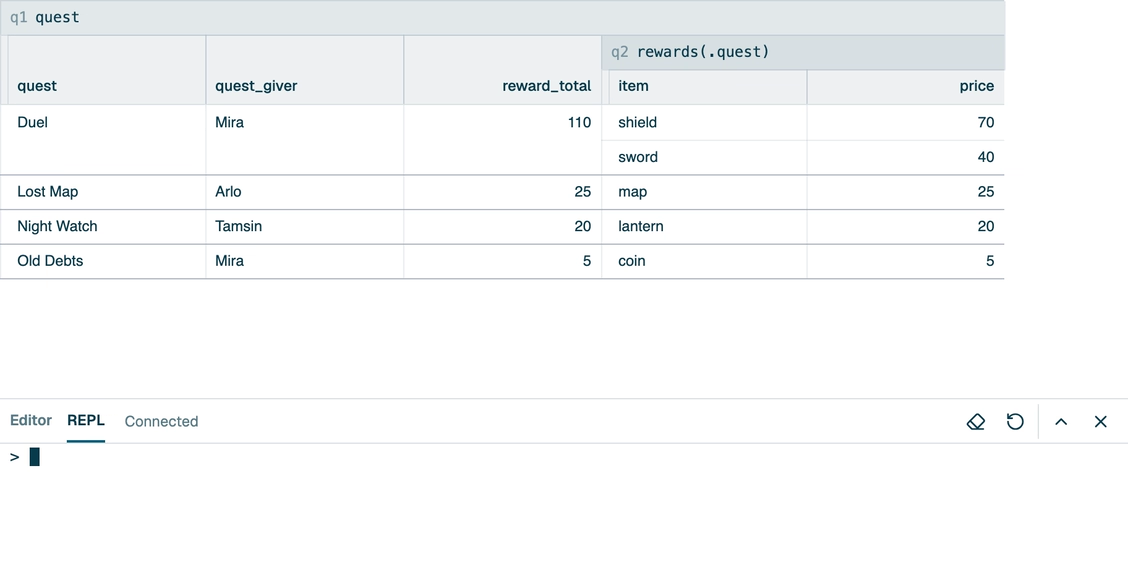
Query results stay current as data changes.
Saka maintains them incrementally, so joins and aggregates stay fast.
A database is a folder of plain-text files in your repository.
The format is built for code review and branching: diffs are readable, and merge conflicts are minimized and easy to resolve.
Planned
Tell your agent what you want instead of editing records by hand.
The schema gives it meaning, queries give it precision, and validation catches its mistakes.
Planned
Items, characters, quests, and drop tables, with the models, textures, and audio they use, kept consistent as the world grows.
Keys, locales, plurals, and review status, with every missing or stale translation one query away.
Typed settings, environments, and rollout rules, with references between them that can't dangle.
Related test data that stays valid when the schema changes, instead of a hundred JSON files that break together.
Products, plans, prices, regions, and entitlements in one model that your app and your billing both read.
Pages, authors, tags, and redirects for a site or its docs, where a broken link fails a check instead of a visitor.
| Feature | Saka | FilesJSON, YAML, CSV | CodeTypeScript, CUE, Pkl | Spreadsheetonline or desktop | SQLitein the repo | Headless CMShosted content platforms |
|---|---|---|---|---|---|---|
| Versioned with your codeThe data lives in your repository and branches with the code that reads it. | Planned | Yes | Yes | PartlyBinary workbook files | PartlyAs one binary file | PartlyGit-based ones only |
| Readable diffs and mergesA change shows up as the lines that changed, and branches merge like code. | Planned | Yes | Yes | PartlyEdit history, no merges | PartlyDiffs via dumps, no merges | PartlyVersion history, limited merges |
| Media assetsModels, textures, pictures, and audio live beside the data that uses them, and change with it. | Planned | PartlyPaths, not checked | PartlyChecked if imported | PartlyImages only | PartlyAs BLOBs | Yes |
| Typed schemaA wrong value is rejected before it's saved or shipped, not when your code reads it. | Yes | PartlyOpt-in schema | Yes | PartlyValidation rules | PartlyLoose unless STRICT | PartlyContent types, checks vary |
| Real relationshipsRecords point at each other, and deleting one that's still in use fails instead of leaving a broken link. | Yes | No | PartlyIf modeled in types | PartlyChecked on entry, not delete | PartlyForeign keys off by default | PartlySome allow broken links |
| Safe schema changesRename or reshape a field, and the existing data is converted with it. | Yes | No | PartlyRenames by refactoring | PartlyRenames only | PartlyLimited ALTER TABLE | PartlyThrough migration scripts |
| All-or-nothing changesAn edit that touches many records lands whole or not at all. | Yes | PartlyPer git commit | PartlyPer git commit | No | Yes | PartlySome have transactions |
| Spreadsheet-style editingBrowse records in a grid and change them a cell at a time. | Planned | PartlyCSV in a spreadsheet | No | Yes | PartlyThrough a GUI tool | PartlyMostly forms, one entry at a time |
| Relational queriesJoin, filter, group, and total across all of your data. | Yes | PartlyWith jq or DuckDB | PartlyLoops in code | PartlyLookups and pivot tables | Yes | PartlyFilters, limited aggregation |
| Mature ecosystemYears of production use, with tools, integrations, and answers online. | NoEarly alpha | Yes | Yes | Yes | Yes | Yes |
Each column describes a kind of tool in typical use. Individual products vary.
| Step | Today | Planned |
|---|---|---|
| SakaQL | Today
| Planned
|
| Browser app | Today
| Planned
|
| In your repository | Today
| Planned
|
| Terminal and editor | Today Nothing yet | Planned
|
| Coding agents | Today Nothing yet | Planned
|
A relational database that lives in your git repo, and a set of tools for you and your agents to work with it.
Saka isn't a server for your app's users, their live traffic, or analytics.
Data that your team writes and your code reads, and that has to stay valid: game content, translations, settings, catalogs, and test data. You describe the schema, and Saka enforces its types, keys, relationships, and any rules you add.
Saka keeps each database in memory, so it's built for data that people and agents edit, not for millions of rows. Each operation also has limits on how long it runs and how much work it does.
For simple data, they're great. As data grows complex, mistakes slip through and questions need scripts.
That's when to turn to Saka: it's plain text in your repo too, but it checks every change and answers queries.
A database checks your data, but it sits outside your workflow: its data doesn't branch with your code or show up in reviews.
A Saka database does both. Its data model and language are also more expressive than SQL, so you can model your data more faithfully.
It helps, but you shouldn't have to. The goal is for your agent to write the SakaQL.
No. Saka uses its own language, SakaQL, and doesn't connect to SQL databases.
Yes, any agent that can run a command. Saka catches an agent's mistakes before they land, so you can trust its changes.
The browser app at app.saka.io. It needs no account, and your databases stay in your browser.
No. Saka is an early alpha. It works, but bugs and missing features mean you shouldn't rely on it for production work yet.
Data loss is a real risk, so export a copy of any database you'd miss.
Saka's core will always be free, and premium features like hosted databases and multiplayer will pay for its development. Their pricing hasn't been decided.
No. Saka is a commercial product. Your data is still yours: it's stored in human-readable text files that any editor can open.
Sufyan Dawoodjee, a software engineer in Mountain View, California.
Still have a question? Get in touch.